
You have just landed in Saudi Arabia for a new job. Your employer says your Iqama is “in process,” and you have no Iqama number, no card, and no Absher account yet. So how do you check anything?
Table of Contents
A new iqama check by passport number is genuinely possible — through one specific government form. The honest catch: no official service lets you search with a passport number completely on its own, and no search can show an Iqama that has not been issued yet. This guide covers the HRSD inquiry step by step, the separate border number route, what Muqeem and Enjaz can and cannot tell you, how long issuance takes, and what to do when a search returns nothing.
Quick Answer
Yes. Use the HRSD (Ministry of Human Resources and Social Development, formerly MOL) Non-Saudi Employee Inquiry. It accepts your passport number together with your nationality and a verification code — no login, no Absher account. If your Iqama is already issued, your employer can confirm the number immediately, because employers see it in Muqeem and Qiwa. Once you have the number, Absher becomes your main tool for everything else.
What You Can Check With a Passport, Border or Iqama Number
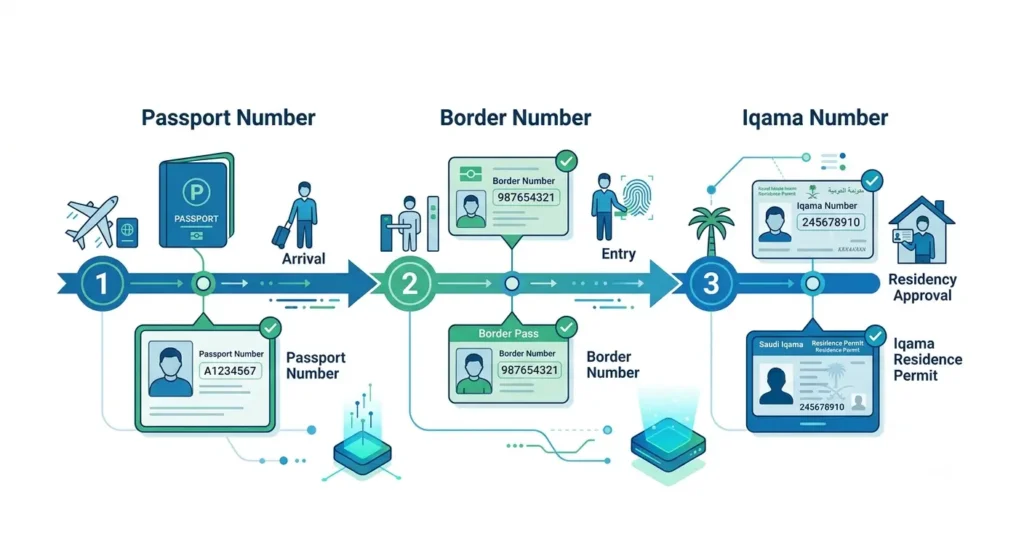
New arrivals constantly mix these three numbers up, so start here.
| Identifier | Where you get it | What you can check with it | What it cannot do |
|---|---|---|---|
| Passport number | On your passport, issued by your home country | HRSD employee record and employment status (with nationality); visa applicant data on MOFA/Enjaz | Cannot open Absher resident services; it is not your residency ID |
| Border number | Assigned at the Saudi entry port; on your entry/visa page in your passport | The same HRSD record; a second HRSD service using border number + date of birth, which can show your record once issued | Temporary — it stops being your main identifier once the Iqama exists |
| Iqama number | Issued with your residence permit; printed on the Iqama card | Absher, expiry and validity checks, Muqeem visa cross-checks, banking, SIM, most government services | Nothing before issuance — it does not exist until your employer completes the process |
One rule explains most failed searches: passport first, border number on arrival, Iqama number for everything after issuance. For background on the permit itself, read our guide to the Saudi Iqama for foreign workers.
Method 1: New Iqama Check by Passport Number on the HRSD Inquiry
This is the only public government form that accepts a passport number for a worker’s record — the route most people mean by mol iqama check by passport number. It is free and needs no account. You will need:
- Your passport number, exactly as printed
- Your nationality, exactly as registered in Saudi records
- The verification code shown on the form
Follow these steps:
- Open hrsd.gov.sa and find the Non-Saudi Employee Inquiry service (in Arabic: الاستعلام عن موظف وافد). The form is in Arabic, so use your browser’s translate option if needed.
- Fill in only one identifier field — your passport number — and leave the border and Iqama fields empty.
- Select your nationality from the list. This step is not optional: the form refuses a passport search without a nationality.
- Type the verification (image) code exactly as shown.
- Click Search and scroll down to read your record.
How to read the HRSD result
A successful search shows your employee record: your name, employer, employment status — most new workers hope to see “on the job” — and your employer’s Nitaqat colour, which our MOL Iqama red green status check guide explains.
Be clear about the limits. This result does not reliably show your Iqama expiry date, and guides disagree on whether the Iqama number itself always appears — so a missing number here is not proof your Iqama has not been issued. Later, you can check your Iqama expiry without Absher once the permit exists. And no result usually just means your record has not been created yet, which is common in the first days after arrival.
Method 2: Check With Your Border Number and Date of Birth
If you know your border number, you have a second, often more informative route. Guides often blend this into the passport method, but it is a different service with different fields:
- Open the HRSD individual services entry point and accept the consent prompt to continue.
- Enter your border number — from your entry record, not your visa or passport number.
- Enter your date of birth, choosing Gregorian if you do not know the Hijri date.
- Enter the captcha and click Next.
- If asked for a one-time code sent to a registered mobile number, enter it.
If your Iqama has been issued, this route can display your personal record including your Iqama number. If nothing appears, issuance is most likely still pending. Do not know your border number? It is normally on the entry stamp or visa page in your passport. Absher also offers a Query Border Number service, and your employer’s arrival representative can confirm it.
Method 3: Check Your Visa Record on MOFA and Enjaz
Before you arrived, your work visa went through the Ministry of Foreign Affairs visa platform. Its Find Applicant Data search accepts your passport number, nationality, visa type and visa issuing authority, plus a captcha. Use it for what it is: confirming your visa applicant data, as in our Enjaz visa application and status check process. It cannot tell you whether your Iqama has been issued — the visa got you into the Kingdom, and the Iqama process only starts after entry.
What About Muqeem? Visa Validity Is Not Iqama Issuance
Muqeem confuses almost every new arrival, because two different things share the name. The public Muqeem visa validity service at vv.muqeem.sa checks whether a visa is valid — mainly exit re-entry and visit visas. You start with an Iqama, visa or border number or birth date, then cross-match with a second detail such as your passport number, date of birth or name. It is useful before travel — later, our Saudi exit re-entry visa guide will matter — but it does not report Iqama issuance status, and a passport number alone is not a starting key there.
The other Muqeem is the employer portal, where companies issue and print resident IDs and view workers’ records. You cannot log in alone — but your HR or PRO officer can, which leads to the most reliable method of all.
Method 4: Ask Your Employer — They Can See It First
Your employer knows before any public form tells you. As soon as your Iqama is issued, the number is visible to HR in Muqeem and in Qiwa, where your work permit and contract are handled — our Qiwa Saudi Arabia services guide explains what employers do there. If the online checks leave you unsure, send HR a short, specific message:
“Please confirm whether my Iqama has been issued. If yes, please share my Iqama number and expiry date. If not, which step is pending, and when should I follow up?”
That wording works because it asks for the one thing only the employer can give you: which step is stuck.
Absher: Your Main Tool After Issuance, Not Before
Many guides claim you can check a new Iqama by passport number inside Absher. Treat that with caution. There is no public Absher service that returns an Iqama number from a passport number, and full Absher registration for a resident normally starts with the Iqama number itself — exactly what you do not have yet. The realistic order is: your Iqama is issued, HR gives you the number, you register on Absher with it and a Saudi mobile in your own name, and from then on your Absher profile shows your Iqama details. A website telling a brand-new arrival to “just log in to Absher with your passport” is skipping the step that makes Absher possible.
How Long Does a New Iqama Take?
There is no official promised number of days, so be suspicious of any guide that guarantees one. What is official is the deadline and the steps your employer must complete after your arrival:
- Issue your work permit through Qiwa using your border number.
- Send you for the medical examination at an approved centre.
- Register your fingerprints (biometrics) with Jawazat.
- Pay the Iqama and work permit fees.
- Issue the Iqama through Muqeem (for company workers).
The Iqama must be issued within 90 days of your arrival. That window is the hard rule: a work permit not issued within 90 days is a serious employer failure on Qiwa — it can even make a worker eligible to transfer without the current employer’s approval — and Jawazat applies a late-issuance fine once the window passes, confirmed at SAR 500 in the domestic worker cases it has answered publicly.
In practice, workers whose employers move quickly often report receiving their Iqama within days to a few weeks. Delays are almost always one of the steps above — a pending medical, unpaid fees, or a work permit not yet issued. Note: sponsors issue Iqamas for dependents and domestic workers through Absher and Musaned, not the company route, so their screens differ.
Why Your New Iqama Check Returns No Result
Work through these causes in order:
- Your Iqama has not been issued yet. The most common reason. A search cannot display a permit that does not exist.
- Your employer has not finished a step. No work permit, pending medical or unpaid fees means no record to find.
- You used the wrong field. A visa number in the border field, or a border number in the passport field, will fail quietly.
- Your passport was renewed. The search only works with the passport registered with Jawazat. If the new number was never updated, search with your border or Iqama number instead, and ask your employer to update your details.
- Nationality mismatch. On the passport route, the nationality must be selected and must match the record.
- Captcha or form trouble. Reload for a fresh code and type it exactly; the form is Arabic-first, so translated labels can mislead you.
- You checked the wrong service. Muqeem visa validity and MOFA applicant data answer different questions.
Keep a small follow-up log — date, service, identifier used, result. It turns a frustrating HR conversation into a two-minute one.
If Your Iqama Is Delayed
- Check the HRSD inquiry with your passport number and with your border number, on different days rather than repeatedly in one hour — records update when the employer’s steps complete, not on refresh.
- Message HR using the script above and note the follow-up date they give you.
- Confirm your own parts are done: medical attended, fingerprints given, passport valid, copies handed over.
- Watch the 90-day mark. If it approaches with no work permit and no Iqama, raise it in writing — the deadline carries real consequences for your employer too.
- Never pay a third party promising to “reveal” your number faster. These official checks are free, and anyone asking for passport scans, an Absher password or one-time codes is a risk, not a shortcut. Enter personal details only on official Saudi (.sa) sites.
Frequently Asked Questions
Q: Can I check my new Iqama using only my passport number?
A: Not completely alone. On the HRSD inquiry you enter your passport number together with your nationality and the verification code. It is the only public government form that accepts a passport number for a worker’s record, and it needs no login.
Q: How do I know if my new Iqama has been issued or not?
A: Check the HRSD inquiry with your passport or border number, try the border number + date of birth route, then confirm with your employer. HR sees issuance and the number in Muqeem and Qiwa as soon as it happens, so their confirmation is the most reliable answer.
Q: Is the border number the same as the passport number or the Iqama number?
A: No. Your passport number is issued by your home country, your border number is assigned at the Saudi entry port and identifies your entry record, and your Iqama number is issued later with your residence permit and becomes your main ID.
Q: Where do I find my border number?
A: It is normally on the entry/visa page in your passport. Absher also has a Query Border Number service, and your employer’s arrival representative can confirm it.
Q: How long does it take to get a new Iqama after arrival?
A: There is no official guaranteed timeframe. Employers must complete issuance within 90 days of arrival. Workers whose employers act promptly often report days to a few weeks, but the only hard figure is the 90-day deadline.
Q: Can I use Muqeem to check whether my Iqama is issued by passport number?
A: No. The public Muqeem service checks visa validity, starting from an Iqama, visa or border number and cross-matching with details like a passport number. It does not show issuance status — that sits with your employer in the Muqeem employer portal and Qiwa.
Q: Why does the HRSD search show no result for my passport number?
A: Usually because your record has not been created yet — issuance is still in process or a step like the work permit or medical is pending. Also check you selected your nationality, typed the code correctly, and are using the passport registered with Jawazat; if you renewed it, try your border number instead.
Final Word
A new iqama check by passport number works — with the right form and expectations. The HRSD inquiry confirms your record, the border route can surface your details once issuance completes, and your employer remains the fastest source of the number. Once it reaches you, register on Absher and keep a private copy of all three numbers, labelled separately.
Pingback: Iqama Number Check with Border Number Online (2026 Guide)
Pingback: Saudi Iqama for Foreign Workers: Complete Guide (2026)