
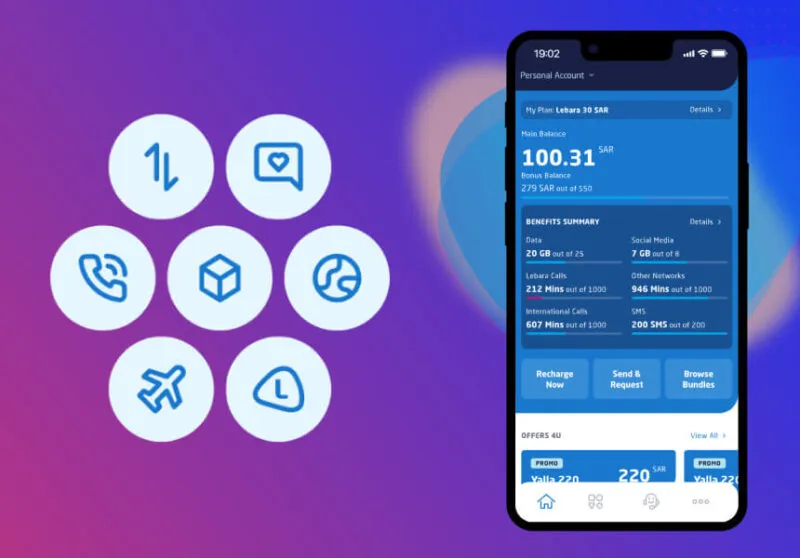
If you use a Lebara SIM in Saudi Arabia, the fastest way to see what you have left is the Lebara balance check code: dial *110# and your remaining credit appears on your screen within seconds. No internet, no app and no login are needed.
Table of Contents
But your main credit is only part of the picture. Your line can also hold a data allowance, package minutes and a package expiry date, and each is checked slightly differently. Many expats lose data or let a package expire simply because they only ever checked one number.
This guide covers every working method for a Lebara balance check in KSA: the direct USSD code, the *000# service menu, the dedicated data balance check, the voice service on 1755, the Lebara KSA app and the online account at lebara.sa. It also explains the Lebara number check code, what to do when a code is not working, and how to confirm your balance after a recharge.
Quick Answer: All Lebara Check Codes at a Glance
| What you want to check | Code or method | Works without internet? |
|---|---|---|
| Main credit balance | Dial *110# | Yes |
| Balance through the service menu | Dial *000# and choose Check Balance | Yes |
| Data balance and bundles | Dial *164# | Yes |
| Balance by voice call | Call 1755 and press 1 | Yes |
| Your own Lebara number | Dial *100# | Yes |
| Full account detail | Lebara KSA app or lebara.sa login | No |
| Help from another phone | Call 057 600 1755 | Yes |
Lebara Balance Check Code: Dial *110#
The direct Lebara balance check code in Saudi Arabia is *110#. It is the quickest method and the one most Lebara users in KSA rely on every day.
Follow these steps:
- Open the phone dialler on your mobile.
- If you use a dual-SIM phone, make sure the Lebara SIM is the one selected for the call.
- Type *110# and press the call button.
- Wait a few seconds. Your remaining balance in Saudi riyals appears on screen, along with a summary of your active packages, minutes and internet allowances where these apply.
This check works on any phone, including basic feature phones, because USSD runs over the mobile signal rather than the internet. Get into the habit of running it before a long call, before travelling, and right after a recharge.
Check Your Balance Through the *000# Menu
Lebara also provides a general service menu on *000#. It is worth being clear about the difference, because older guides often list this code on its own: *110# shows your balance directly, while *000# opens a menu of Lebara services, and the balance is one option inside it.
To use it:
- Dial *000# from your Lebara SIM and press call.
- Read the menu that appears on your screen.
- Select the Check Balance option by typing its number and sending your reply.
- Your balance details are then displayed on screen.
The menu is worth exploring once, because it also lists other account services, such as recharge and credit transfer options. If you ever forget the direct code, *000# is the front door to most Lebara self-service actions.
Lebara Data Balance Check Code
Your credit balance and your data balance are two different things. You can have riyals of credit on the line and still have no internet left, because the data inside your package has run out.
For a Lebara net balance check, dial *164#. This code is used to view your data bundles and how much internet remains in them, shown in MB or GB.
You can also see your remaining data by dialling *110#, whose response includes a summary of active package allowances on many lines, or in the Lebara KSA app, which shows a clear usage breakdown.
If your internet stops while your credit looks fine, check the data balance first. In most cases the package data is finished, while calls and SMS keep working because they draw on credit or separate package minutes.
How to Check Your Lebara Internet Balance in Detail
A Lebara internet balance check is really a package check. Your remaining internet depends on which package or add-on is active, how much of it you have used, and when it expires. When you check, look for these four details:
- Remaining data: how many MB or GB are left in the active bundle
- Used data: how much of the bundle you have already consumed
- Package name: which bundle the data belongs to, including any separate social media data
- Expiry date: the day the remaining data stops being valid
The app gives the clearest version of this information, with data, minutes and SMS side by side. Watch out for separate social data: some packages include a dedicated social apps allowance on top of the general data, so one can be finished while the other remains. Read both figures before buying an add-on.
Check Lebara Balance by Calling 1755
If you prefer to hear your balance, use the Lebara voice service.
- Dial 1755 from your Lebara SIM.
- Listen to the menu and press 1.
- A voice message reads out your balance details, including your main credit and information about your bundles.
Calling 1755 is also how you reach Lebara customer care from your own SIM. From another phone or network in Saudi Arabia, call 057 600 1755. From outside Saudi Arabia, call +966 57 600 1755.
Check Lebara Balance With the Lebara KSA App
For the fullest view of your line, use the official Lebara KSA app, which many guides also call the MyLebara app. It is free on Android and iOS.
- Download the Lebara KSA app from Google Play or the App Store.
- Open the app and log in with your Lebara number or email and your password. New users can register inside the app.
- Your balance appears on the main dashboard as soon as you sign in.
Inside the app you can see much more than the USSD response: main and bonus balance, remaining data, minutes and SMS for each package, package validity, and recharge and transaction history. You can also recharge and buy add-ons there. The app needs internet, so it does not replace the USSD codes when your data is finished: use the codes for a fast offline check and the app when you want detail.
Check Lebara Balance Online at lebara.sa
You can also do a Lebara balance check online through your account on the Lebara Saudi Arabia website.
- Go to lebara.sa in your browser and open the login or MyLebara page.
- Sign in with your mobile number or email and your password.
- Your balance and account details are shown on the home page of your account.
This is the most comfortable option on a computer, and it is handy when your phone is lost or being repaired.
Lebara Number Check Code: Find Your Own Number
A balance check and a number check answer different questions, and new SIM users mix them up all the time. A balance check tells you how much credit or data you have. A number check tells you the phone number assigned to the SIM itself, which is what you need when you have just bought the SIM or found an old one in a drawer.
To find your own Lebara number, dial *100# from the Lebara SIM and press call. Your number is displayed on the screen. Save it in your contacts under your own name, so it is there whenever a shop, clinic or office asks for it.
Main Balance, Data Balance and Package Balance: What Is the Difference?
| Type of balance | What it tells you | How to check it |
|---|---|---|
| Main balance | Money credit on your line, in Saudi riyals | Dial *110# |
| Data balance | Mobile internet remaining in your bundle | Dial *164# or open the app |
| Package balance | Everything left in your package: data, minutes and SMS together | Dial *110#, *164# or open the app |
| Minutes balance | Calling minutes remaining in your package | Dial *110# or open the app |
| Package validity | How long your package stays active before it expires | App or online account |
A simple example shows why the difference matters. You recharge 50 riyals, so your main balance looks healthy. You then finish the 20 GB inside your package. Your credit is still there, but your internet stops or starts being charged from credit at pay-as-you-go rates. If you only ever checked *110#, you would think nothing was wrong.
How to Check Your Lebara Package Balance and Expiry Date
Every Lebara package has a fixed validity period. When it ends, unused data, minutes and SMS from the package can expire under the package terms, even if your main credit is untouched. Checking the expiry date is therefore as important as checking the amounts. To see your full package position:
- Open the Lebara KSA app or log in at lebara.sa for the clearest view.
- Note each active package’s remaining data, minutes and expiry date.
- For a quick offline check, dial *164# for data bundles or *110# for the balance summary.
If a package is about to expire with a lot of data left, use the data for the things you were saving it for, such as app updates or photo backups, before the date passes.
Check Your Balance After a Recharge
After any recharge, always confirm the money actually landed. Dial *110# a minute or two later and compare the figure with what you expected.
If you recharge with a voucher card, the Lebara recharge code is *111*VoucherNumber*ID#, where the ID is the Iqama or ID number used when your SIM was registered. You can also recharge through the *000# menu, by calling 1755 and following the voice instructions, in the app, or online at lebara.sa.
If the balance has not updated, wait a few minutes and check again, and keep your voucher and confirmation message until the credit appears. If it still does not appear, call 1755 from the SIM, or 057 600 1755 from another phone, and ask customer care to trace it.
Lebara Balance Check Without Internet
Good news: the main methods do not need the internet at all. USSD codes such as *110#, *000#, *164# and *100#, and the 1755 voice service, all run over the regular mobile signal.
That makes them the right tools when balance checks matter most: your data has run out, or you are travelling with weak coverage. Your SIM simply needs to be active and connected to the Lebara network.
Lebara Balance Check Code Not Working? Try These Fixes
If *110# or another code gives an error, shows a blank screen or never responds, work through this list before you worry:
- Check the SIM slot. On a dual-SIM phone, the code must be dialled from the Lebara SIM. Change the default calling SIM and try again.
- Check your signal. USSD needs a mobile connection. Move to a spot with stronger coverage and redial.
- Restart your phone, then redial carefully, typing the code exactly, including the star at the start and the hash at the end. A restart clears most temporary network glitches.
- Wait and retry. If the network is busy, USSD sessions can time out. A few minutes usually fixes it.
- Try the alternatives. If the direct code fails, dial *000# and choose Check Balance, call 1755 and press 1, or use the app or lebara.sa on Wi-Fi.
- Call customer care. If nothing works, call 1755 from the SIM or 057 600 1755 from another phone. There may be an account or SIM problem only Lebara can fix.
One more check: make sure you are using a Saudi Lebara code. Lebara operates in several countries, and codes published for the United Kingdom or Europe do not work on a Saudi SIM. Mixing up country codes is the most common reason a code found online appears broken.
Frequently Asked Questions
Q: What is the Lebara balance check code in Saudi Arabia?
A: The direct code is *110#. Dial it from your Lebara SIM and your remaining credit appears on screen. You can also dial *000# and choose Check Balance from the menu.
Q: How do I check my Lebara data balance?
A: Dial *164# to see your data bundles and the internet remaining in them. You can also dial *110# for a package summary, or open the Lebara KSA app for a full data usage breakdown.
Q: How do I check my Lebara number?
A: Dial *100# from your Lebara SIM. Your own mobile number is displayed on the screen. This is a number check, not a balance check, so it does not show any credit or data.
Q: Can I check my Lebara balance without internet?
A: Yes. The USSD codes *110#, *000#, *164# and *100#, and the voice service on 1755, all work over the mobile signal with no data or Wi-Fi. Only the app and website methods need an internet connection.
Q: Is there an SMS code to check Lebara balance in KSA?
A: No separate SMS balance code is published for Lebara in Saudi Arabia. The reliable offline options are the USSD codes and the 1755 voice service, which do the same job in a few seconds.
Q: Can I check the Lebara balance of another number?
A: No. A balance can only be checked from that SIM itself, by calling 1755 from it, or through the account holder’s own app or online login.
Q: Why is my Lebara balance check code not working?
A: The usual causes are dialling from the wrong SIM on a dual-SIM phone, weak signal, a mistyped code, or a temporary network problem. Restart the phone, redial *110#, or use *000#, 1755 or the app instead.
Pingback: Zain SIM Number Check Code (2026 Guide)
Pingback: Mobily SIM Number Check Code (2026 Guide)
Pingback: STC SIM Number Check in Saudi Arabia (2026 Guide)